
Curve Control Driving Challenge
Reviews
Curve Control Driving Challenge works because it removes everything except timing. The single-input control scheme is immediately understandable, and the rising speed creates a difficulty curve that rewards anticipation over frantic tapping. It suits players who enjoy short, repeatable reaction challenges on desktop or mobile. The trade-off is limited variety: the input describes no modes, unlocks, or score tracking, so the appeal depends on how much you enjoy chasing a longer run under the same rule.
About this game
One-Touch Steering, Immediate Consequences
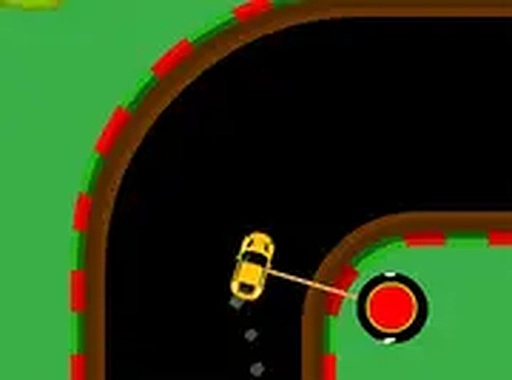
Curve Control Driving Challenge reduces driving to a single input: a tap or click that changes the vehicle's direction left or right. There is no accelerator, brake, or camera control. The road curves continuously, and the only feedback that matters is whether your vehicle stays between the edges. One touch of either side ends the run instantly, so every input carries the same weight as the first.
How Speed Changes the Decision Space
The game begins at a slow pace, which gives new players room to learn the relationship between tap timing and vehicle movement. Each successful turn nudges the speed upward. As the pace increases, the same tap that felt comfortable at the start now covers more road in less time. Turns arrive closer together, and the margin for a late or early input shrinks. This progression is the core difficulty curve, and it continues until a mistake ends the session.
Built for Short Sessions and Quick Restarts
Because a run ends on the first collision, sessions are naturally short. There is no download, no account requirement, and no cost. The game runs in a browser on desktop and mobile, and full-screen mode is available for a less cluttered view. The minimalist interface keeps attention on the road rather than menus or counters, which suits players who want a focused reaction test rather than a long campaign.
Reading the Road Ahead
Improvement comes from looking further down the road instead of reacting to the vehicle's current position. Anticipating a curve before it arrives allows a short, precise tap rather than a panicked correction. Oversteering is a common failure: tapping too hard or too often sends the vehicle across the road. Staying calm as speed rises matters as much as raw reaction time, and short breaks help when fatigue slows responses.
Compatibility
FAQ
Comments
Sign in to leave a review
No comments yet.






Editorial Notes