Open
Fashion Avatar Creator - Dress Up Game
Game

Fashion Avatar Creator - Dress Up Game

Hypercasual
Developer: Archer Reign Digital
Published: 2025-07-19
Updated: 2026-07-05

Runs in your browser — no download required.

What players say

Fashion Avatar Creator offers a relaxing, pressure-free experience for designing unique characters. With a wide range of skin tones, eye colors, hairstyles, and hair colors, players can express their creativity freely. The simple interface is perfect for young children, and the offline play ensures fun anywhere. No ads or in-app purchases make it a trustworthy choice for parents.

About this game

Game Introduction

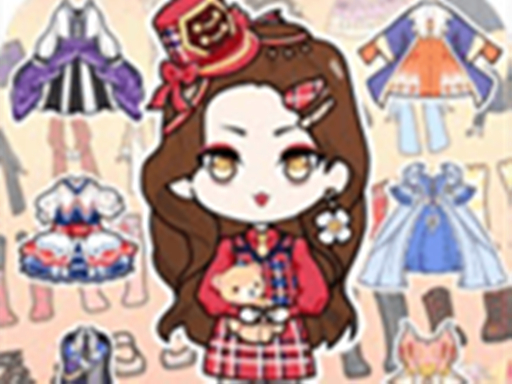
Fashion Avatar Creator is a character design game that allows players to create their own unique avatars. Starting with a blank canvas, players select from a variety of skin tones, eye colors, hairstyles, and hair colors. The goal is to build a look that reflects personal style or imagination. This game is designed for children and families seeking a safe environment for creative expression. Finished avatars can be saved as profile pictures or used as custom emojis in messaging apps. The focus is on creativity and self-expression without any pressure. There are no scores or timers, so players can relax and enjoy the design process. Every choice changes the character, encouraging experimentation with many combinations. The interface is simple and friendly, making it easy for young players to navigate. Fashion Avatar Creator is a wonderful way to explore fashion and art in a digital world.

How to Play

Players begin by selecting a skin tone from a range of shades. Next, they choose an eye color that matches their vision. Then, they pick a hairstyle and hair color to complete the look. Players can mix and match features as many times as they like. The game uses simple taps and clicks, so it works well on phones, tablets, and computers. There are no complicated rules or steps to follow. Once satisfied with the avatar, players can save it to their device. They can also use it as a custom emoji in messaging apps. The process is quick and easy, perfect for short play sessions. Children can play alone or with siblings, exploring different styles together. The game encourages trial and error, so every attempt leads to a new creation.

Game Features

Endless customization options allow players to create unique avatars every time. The game is safe for all ages with no ads or inappropriate content. An easy-to-use interface is designed for young children. There are no time limits or scores, so players can relax and create. Avatars can be saved and used as custom emojis. The game works offline after the initial load. Regular updates add new hairstyles and colors. Parents can trust that the game is free from violence and other harmful content. The simple design means no learning curve, just instant fun.

Tips for Success

Experiment with different combinations of skin tones, eye colors, hairstyles, and hair colors to discover your favorite look. Take your time and enjoy the process—there is no rush. Try creating avatars that represent different moods or characters to get the most out of the customization options. Save your creations to use as profile pictures or custom emojis to share with friends and family. Playing with siblings or friends can inspire new ideas and make the experience more fun.

Compatibility

✅ This game supports:
- Desktop browsers (Chrome, Edge, Safari)
- Mobile browsers (Chrome on Android, Safari on iOS)
❌ Does NOT support: - Internet Explorer - Very old browser versions
👉 Try refreshing or updating your browser
FAQ
Can I use my avatar as a profile picture on social media?
Yes, you can save your finished avatar to your device and then upload it to social media platforms as a profile picture. The game provides a simple save function that stores the image in your device's gallery.
Is there a limit to how many avatars I can create?
There is no limit to the number of avatars you can create. You can design as many characters as you like, experimenting with different combinations each time. Each creation can be saved separately.
Does the game require an internet connection to play?
After the initial download, the game works offline. This means you can play anywhere without needing an internet connection. Updates may require a connection to download new content.
Are there any in-app purchases or hidden costs?
The game is free to play with no in-app purchases or hidden costs. All customization options are available without any additional charges. Parents can feel confident that there are no surprise expenses.
Can I share my creations with friends who don't have the game?
Yes, you can share your saved avatars as images through messaging apps or email. Your friends can view them even if they do not have the game installed. This makes it easy to show off your designs.
What age group is this game suitable for?
This game is designed for children and families, making it suitable for all ages. The simple interface and lack of complex rules make it accessible to young children, while the creative options appeal to older players.
Advertisement

Guess You Like