
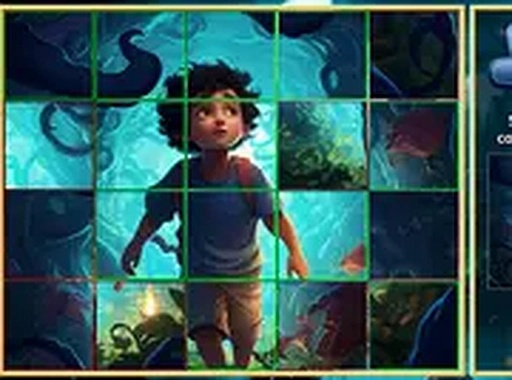
Tile Swap Picture Puzzle
Reviews
Tile Swap Picture Puzzle trades the rigid movement of traditional sliding puzzles for a more forgiving swap mechanic. Because you can exchange any two tiles, the game suits players who want to rebuild an image without wrestling with adjacent-only moves. The absence of timers and scores reinforces a relaxed pace, and the always-available preview supports planning over guessing. The main limitation is that the input does not describe difficulty scaling or puzzle count, so the long-term challenge is unclear.
About this game
How the Swap Mechanic Works
Most sliding puzzles limit you to moving tiles into an adjacent empty space. Tile Swap Picture Puzzle removes that restriction: you select any two tiles on the grid and exchange their positions directly. This single change reshapes how you solve the puzzle. Instead of planning a chain of incremental slides, you identify where a piece belongs and place it there in one action. The result is a puzzle that feels more approachable, particularly for players who find traditional sliding puzzles tedious or frustrating.
Planning with the Preview
A preview of the completed picture is always available on screen. That reference image is not just a convenience; it changes your decision-making. You can compare the scrambled grid against the finished scene, spot which tile belongs in which position, and swap accordingly. The preview reduces guesswork, so progress depends on observation and spatial reasoning rather than trial and error. [IMG_1]
Visual Themes and Pace
The puzzles use a collection of carefully selected images, including peaceful landscapes and gentle illustrations. Each picture is divided into a grid, and the range of scenes keeps the experience from feeling repetitive. The visuals are designed to be soothing, which matches the game's relaxed pace. There are no timers and no score counters, so you can take as long as you need. You can pause and resume at any time, making it suitable for short breaks or longer sessions. [IMG_2]
Access and Controls
The game runs entirely in a web browser, so no downloads or installations are required. It works on desktop computers and mobile devices. Touch controls are fully supported on tablets and phones, letting you tap and swap tiles. A full screen mode is available for a more focused experience, and the interface adapts to different screen sizes automatically.
Building Visual Recognition
Regular play exercises your ability to recognize patterns and spatial relationships. As you work through puzzles, you naturally develop strategies for identifying matching edges and sections. Reconstructing an image from scrambled pieces provides a clear sense of progress. Over time, your puzzle-solving speed and accuracy can improve even without formal practice.
Compatibility
FAQ
Comments
Sign in to leave a review
No comments yet.


Editorial Notes