
Color Bubble Blast Puzzle
Reviews
Color Bubble Blast Puzzle succeeds by refining a classic formula. The controls are responsive, the colors are distinct, and the progression system gives clear goals. The moving bubble cluster keeps each level tense without feeling unfair. It is a perfect choice for short breaks or longer sessions, and the lack of ads or paywalls makes it a respectful experience for players of all ages.
About this game
Core Gameplay Loop
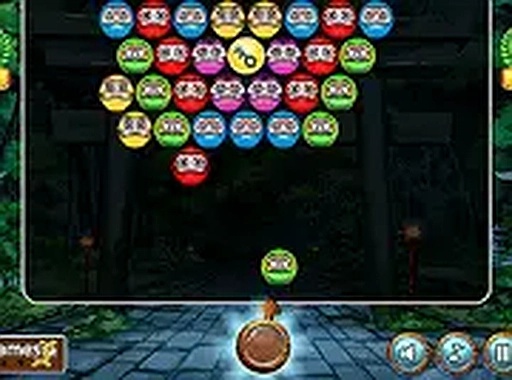
Color Bubble Blast Puzzle presents a straightforward challenge: a cluster of colored bubbles advances steadily from the top of the screen toward a line at the bottom. Players control a launcher at the bottom, firing bubbles upward to create groups of three or more identical colors. When a match forms, those bubbles pop and disappear, reducing the overall cluster. The primary objective is to eliminate all bubbles before any of them cross the danger line. Each level introduces a new arrangement of bubbles, keeping the experience fresh without altering the fundamental rules.
Progression and Unlock System
As players clear each stage, they earn keys that open the next set of missions. This simple progression structure provides a clear sense of accomplishment without complex menus or branching paths. The difficulty gradually increases as later levels feature denser bubble clusters, faster movement, or more color variations. This steady ramp ensures that newcomers can learn the basics while experienced players still find engaging challenges. The game does not require an account or any personal information to track progress, as it saves your place automatically in the browser.
Controls and Accessibility
The controls are minimal and intuitive. On a desktop computer, players click the mouse to aim and fire. On a touchscreen device, tapping the screen launches a bubble toward the point of contact. The game also supports full-screen mode, which expands the play area for a more focused session. Because the interface is clean and uncluttered, players of all ages can start playing immediately without reading lengthy instructions. The responsive design ensures that the game adapts to different screen sizes, from small phones to large monitors.
Visual Style and Atmosphere
The graphics use bright, saturated colors that make each bubble distinct and easy to identify. The background remains simple so that the action stays the primary focus. Animations are smooth but not distracting, with bubbles popping in a satisfying burst. The overall visual tone is cheerful and inviting, which suits the casual nature of the game. There are no violent or intense elements, making it appropriate for family play. The sound effects, while optional, provide gentle audio feedback for each shot and match.
Strategic Depth
Although the core mechanic is simple, Color Bubble Blast Puzzle offers room for strategic thinking. Players must consider not only which color to shoot but also the angle and trajectory. Bouncing bubbles off the side walls can reach clusters that are otherwise blocked. Since the bubble cluster moves continuously, timing becomes a factor: waiting for the right moment can make a difficult shot possible. Prioritizing bubbles near the bottom of the cluster slows the overall advance, buying more time to clear the rest. These small decisions add layers of depth without overwhelming casual players.


Comments
Sign in to leave a review
No account? Create one
No comments yet.